FOR DIAMOND AND GOLD WHOLESALERS

Which stone is with whom, how many days it's been out, who owes how much — on one screen.

GemsRoute brings stock, memo and receivables tracking into one system. The identity and ownership of every stone you sell pass automatically through GemsTrace to your dealer, and from there to the end customer.

Try free for 7 days · No credit card required · Import your Excel in 10 minutes

360° rotating view of a diamond
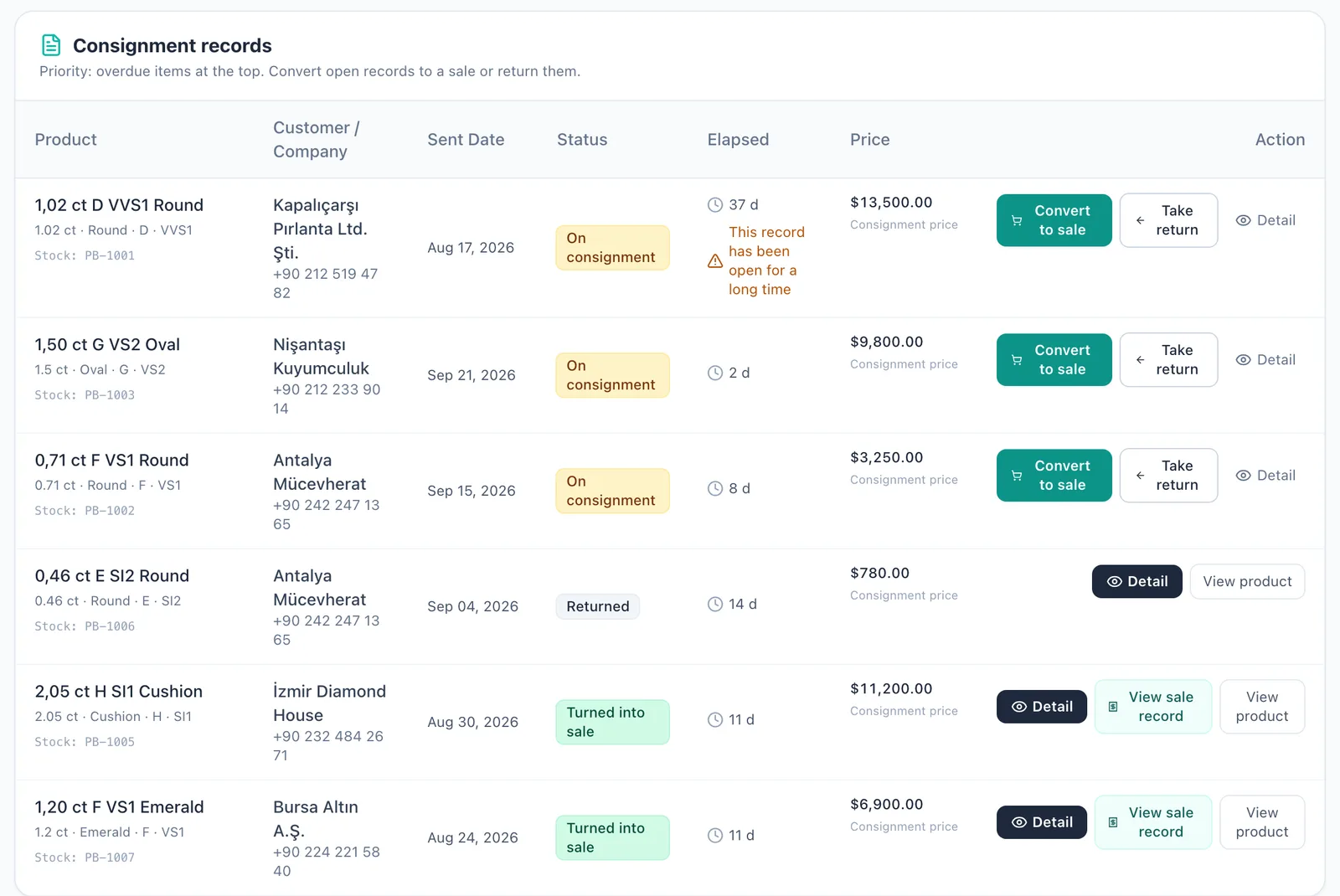
Consignment screen: 3 stones out, one for 37 days; warning banner for the overdue record.

The stone isn't in Excel. It's out.

At any moment, a large share of a wholesaler's stock is on memo: at the dealer, at the workshop, with the customer. Excel can't track that movement. How many days a stone has been out, at what value it went, who bought what on terms — it all lives in three separate files. A missing stone noticed at month-end, an open balance noticed too late.

GemsRoute was built for this.

Every stone, recorded with its certificate number.
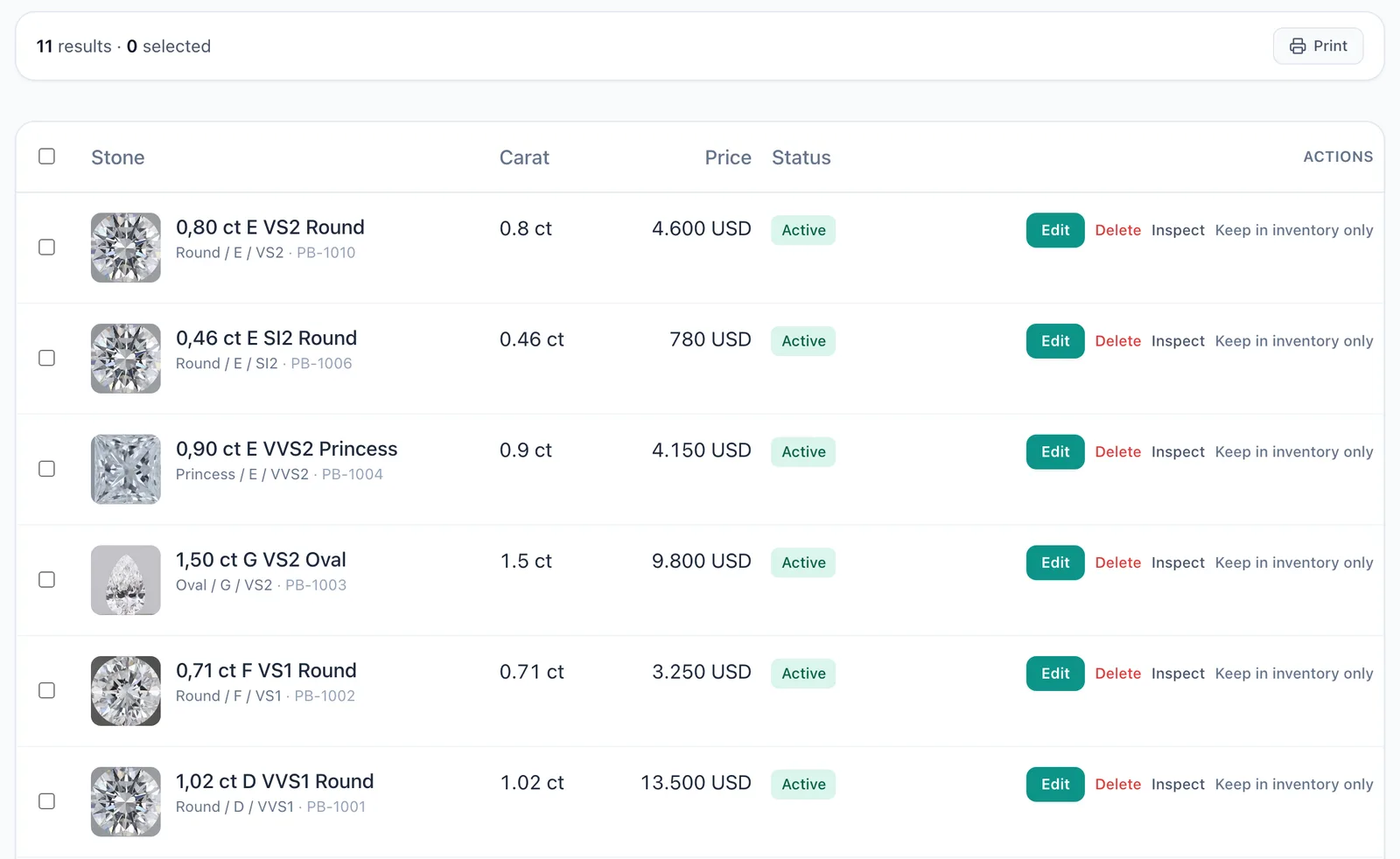
GIA, IGI, HRD certificate details, cut, color, clarity, carat, cost and list price. Import your existing Excel via CSV, export with one click. The stone's full movement history, from entry date to today, in a single row.

  • Instant search by certificate number
  • Photo, 360° video and certificate PDF on the stone
  • Bulk price updates, USD/EUR/TRY
My Products screen: 11 stones; stock list with carat, price and status columns.

Stock

All plans

Every stone, recorded with its certificate number.

My Products screen: 11 stones; stock list with carat, price and status columns.
Details

GIA, IGI, HRD certificate details, cut, color, clarity, carat, cost and list price. Import your existing Excel via CSV, export with one click. The stone's full movement history, from entry date to today, in a single row.

  • Instant search by certificate number
  • Photo, 360° video and certificate PDF on the stone
  • Bulk price updates, USD/EUR/TRY
See every stone that's out, day by day.

Who it went to, when, at what value, when it's due. An alert for memos past 30 days. A returned stone goes back to stock, a sold stone goes to receivables — automatically.

  • Send as a single stone or as a parcel
  • "Convert to sale" and "Take back" in one click
  • Overdue memos at the top of the list every morning
Consignment records: 6 stones; who has each stone, date sent, days out and price.

Memo

All plans

See every stone that's out, day by day.

Consignment records: 6 stones; who has each stone, date sent, days out and price.
Details

Who it went to, when, at what value, when it's due. An alert for memos past 30 days. A returned stone goes back to stock, a sold stone goes to receivables — automatically.

  • Send as a single stone or as a parcel
  • "Convert to sale" and "Take back" in one click
  • Overdue memos at the top of the list every morning

Who owes how much, in real time.

Sales on terms, collections, open balances, supplier payables. Statements per customer and per supplier. The list of overdue collections is ready every morning.

  • Receivables entry created automatically at the moment of sale
  • Due-date reminders
  • Customer segments and credit limits
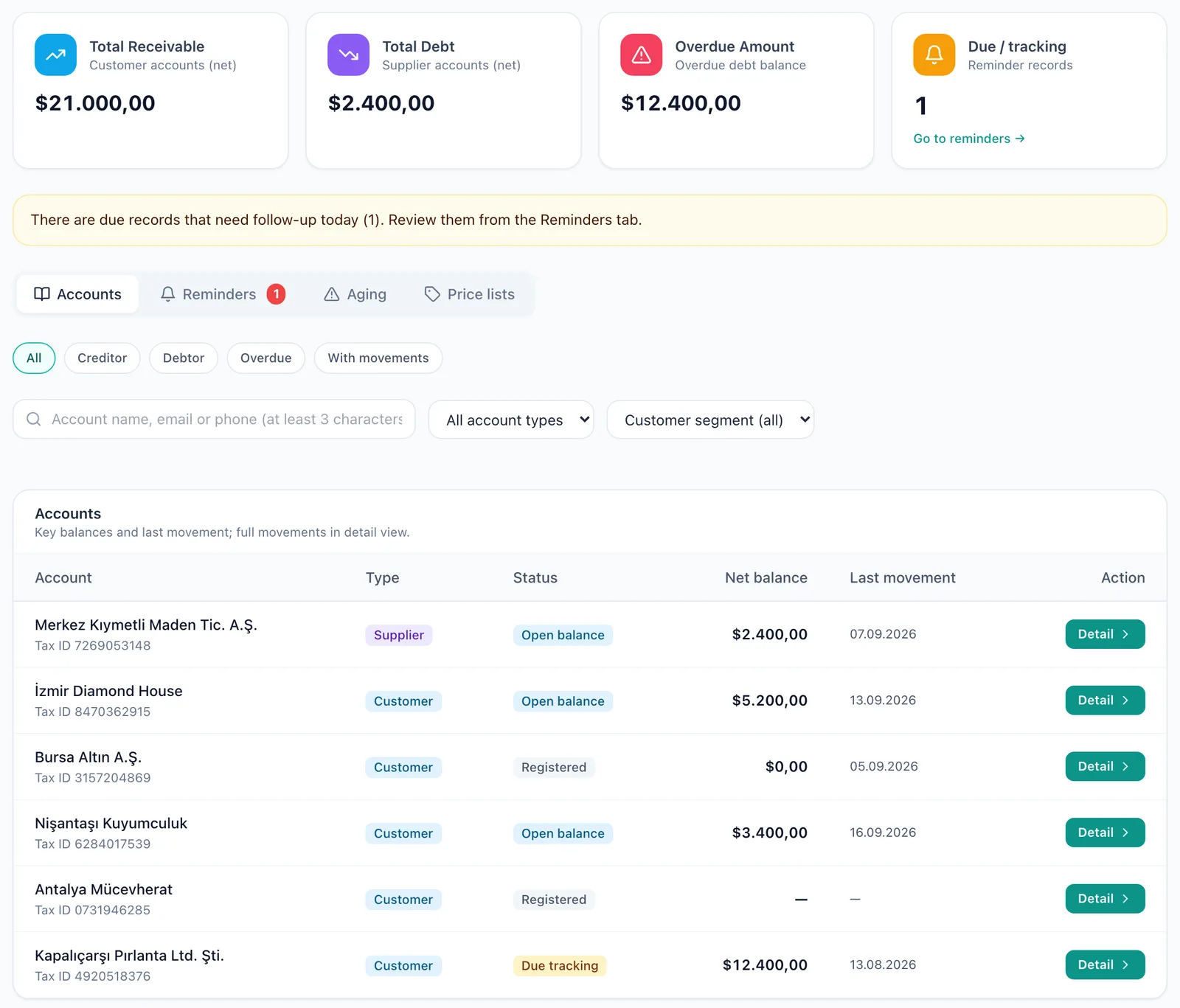
Receivables screen: total receivables 21,000 USD, overdue 12,400 USD; customer and supplier balances.

Receivables

All plans

Who owes how much, in real time.

Receivables screen: total receivables 21,000 USD, overdue 12,400 USD; customer and supplier balances.
Details

Sales on terms, collections, open balances, supplier payables. Statements per customer and per supplier. The list of overdue collections is ready every morning.

  • Receivables entry created automatically at the moment of sale
  • Due-date reminders
  • Customer segments and credit limits

Gold

Pro and up

Fine-gold tracking by karat, from production to closing.

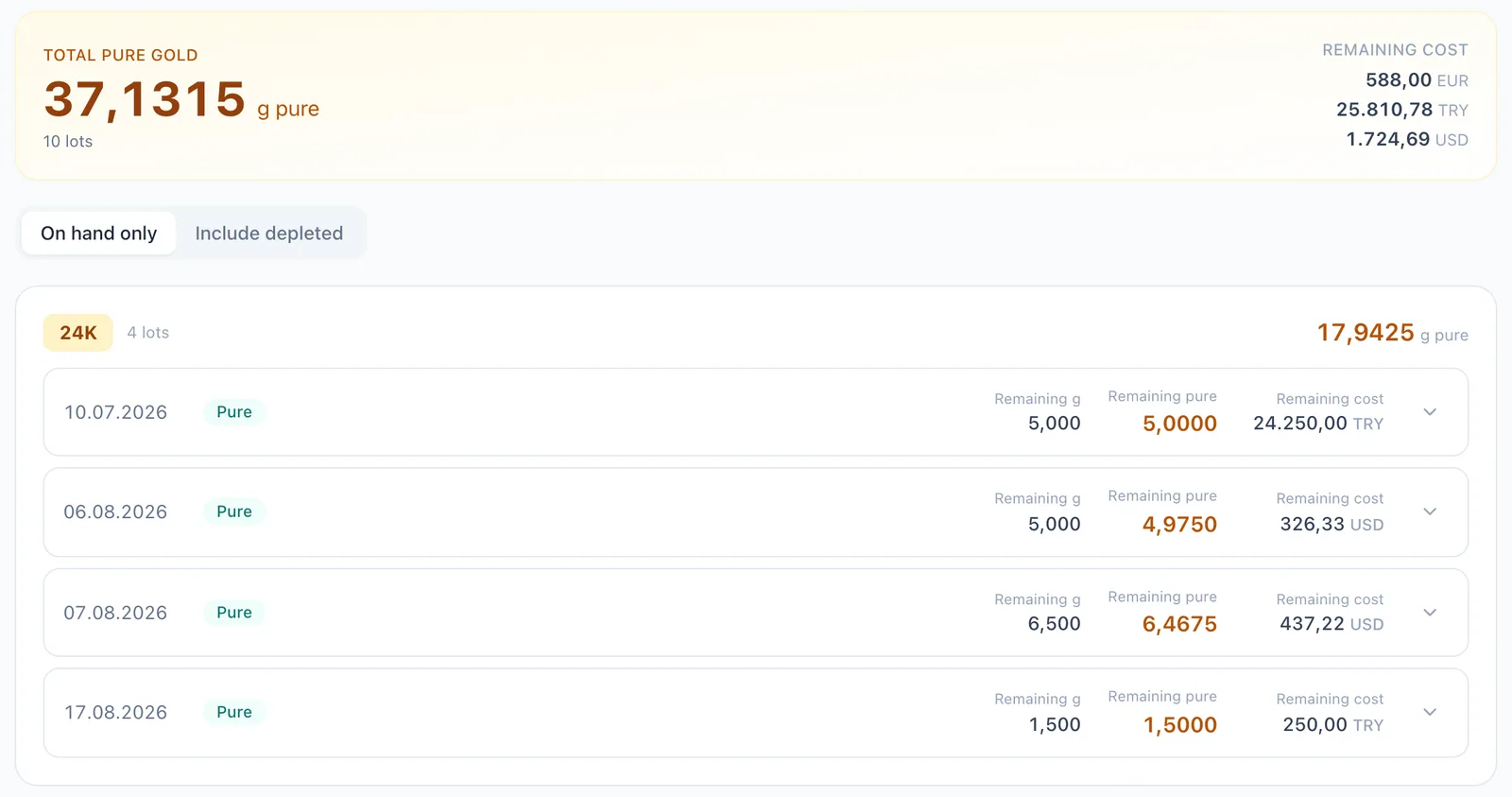
Gold stock: 37.1315 g fine gold in total; 4 lots, each with remaining grams and fine-gold equivalent.
Details

Bullion, drawn wire, scrap, sweepings: every lot recorded with its karat and fine-gold equivalent. Gold purchase, melting, refining, production order and production closing in one flow. Loss and reconciliation are calculated automatically at every closing.

  • Automatic karat → fine gold conversion (22 karat 3 g = 2.750 g fine gold)
  • Stock sufficiency and current price check on the production order
  • Finished goods stock, with stone + gold cost

GEMSTRACE INTEGRATION

The identity of the stone you sell changes hands with the stone.

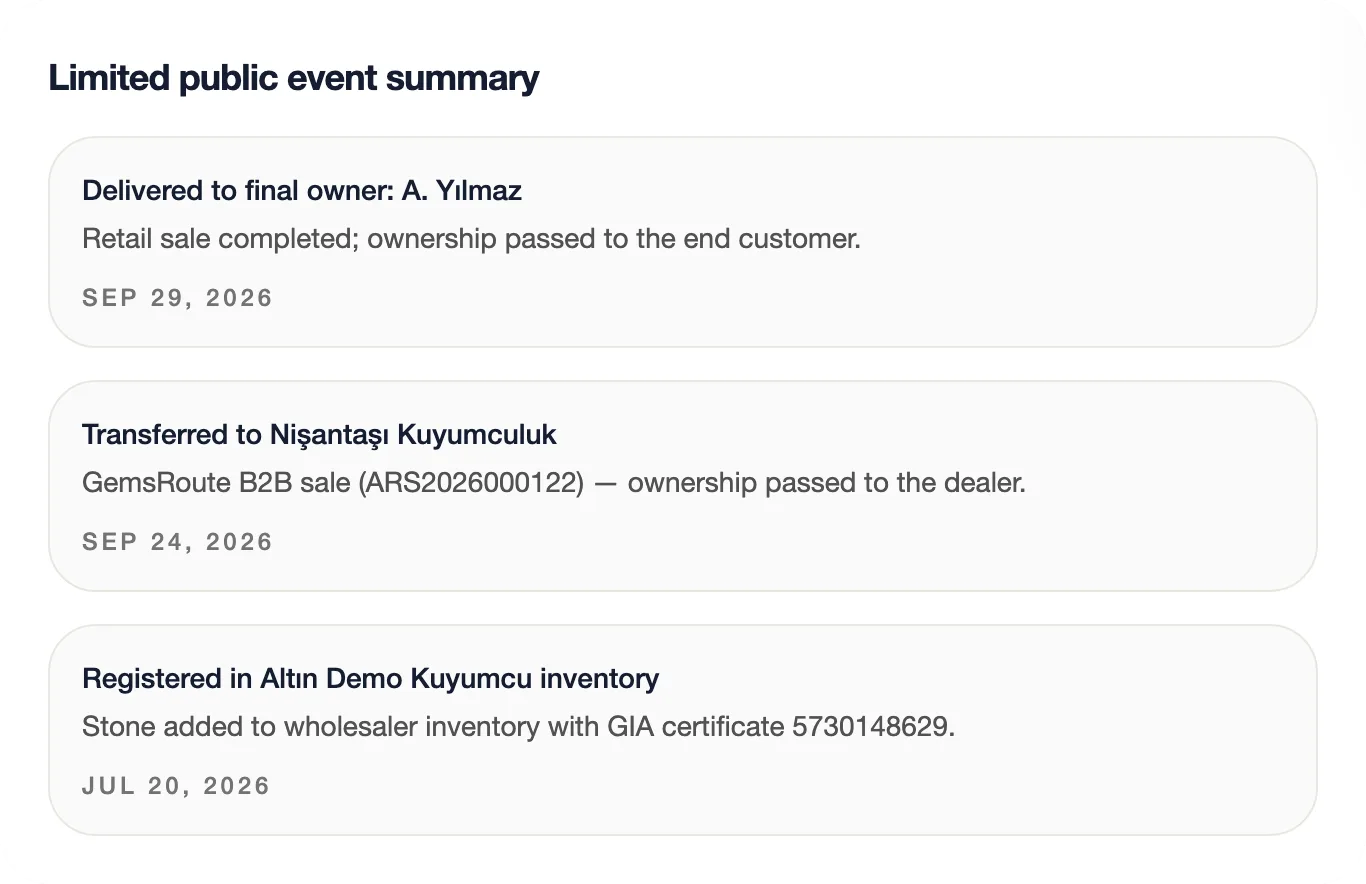
Every stone you enter into GemsRoute gets a digital identity in GemsTrace: its origin, its certificate, whose hands it passed through. When you sell the stone to your dealer, ownership is transferred to the dealer automatically. When the dealer sells to the end customer, the right passes to the end customer. The chain doesn't break.

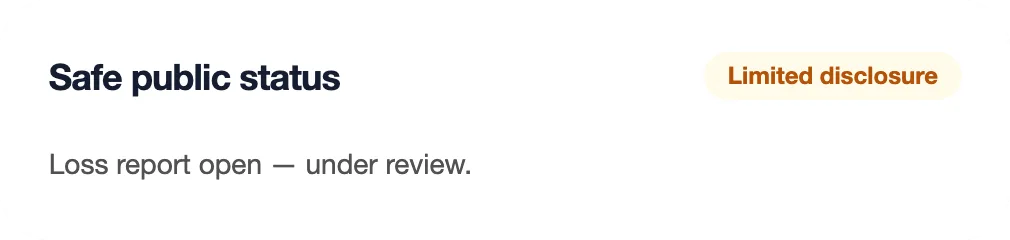
It continues after the sale: Is the stone still with its owner? Is there a loss or theft report? The end customer, and any jeweler who later wants to buy the stone, can see this within seconds using the certificate number.

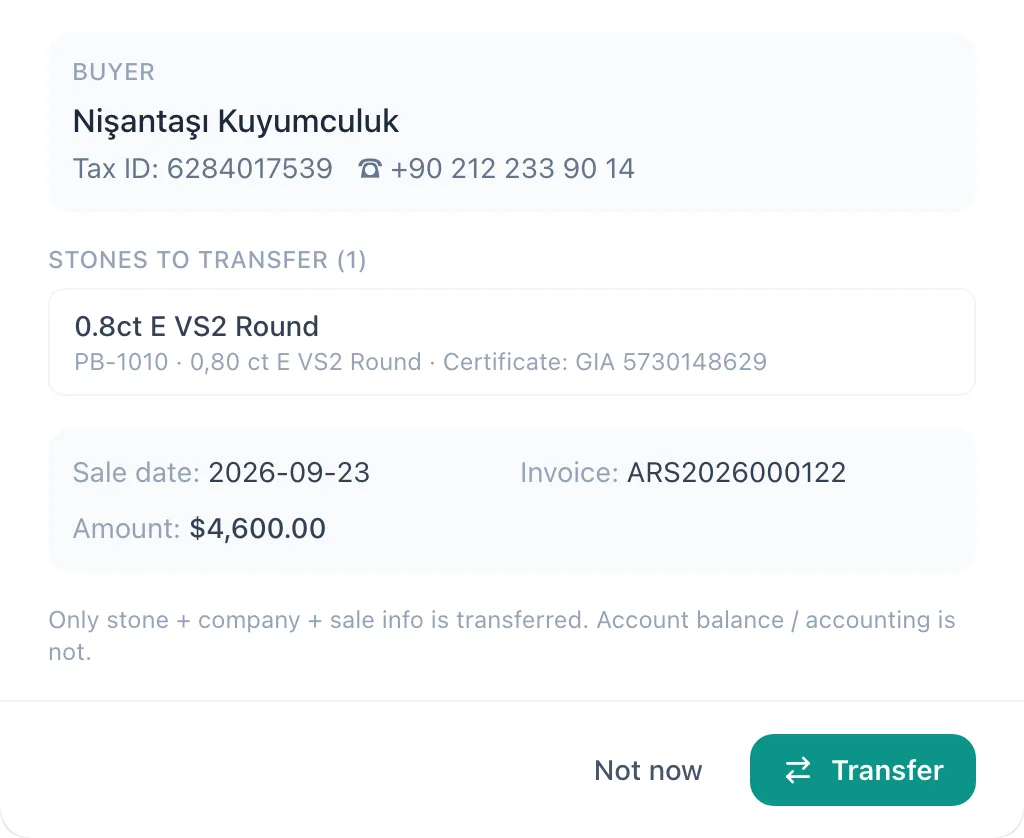
Post-sale transfer window: buyer Nişantaşı Kuyumculuk, stone to transfer 0.80 ct E VS2 Round, GIA certified.

Sale completed → Ownership chain updated

GemsTrace ownership chain: recorded in wholesaler inventory, transferred to the dealer, delivered to the final owner.

For the wholesaler

The stone you sell can't circulate in the market with a fake certificate. The identity comes from you; the chain starts with you.

For the dealer

Proves where the stone they bought came from. Even without a GemsTrace account, the transfer is recorded; they claim their account with a single email.

For the end customer

Reports a loss or theft; anyone who later wants to buy the stone sees the warning.

For the wholesaler

The stone you sell can't circulate in the market with a fake certificate. The identity comes from you; the chain starts with you.

For the dealer

Proves where the stone they bought came from. Even without a GemsTrace account, the transfer is recorded; they claim their account with a single email.

For the end customer

Reports a loss or theft; anyone who later wants to buy the stone sees the warning.

GemsTrace event record: loss report received, review in progress.GemsTrace public status: loss report open, limited disclosure.
This is how a stone with an open loss report appears in a verification search.
Verify a stone

Your dealer and your customer see the stone with photos, video and certificate.

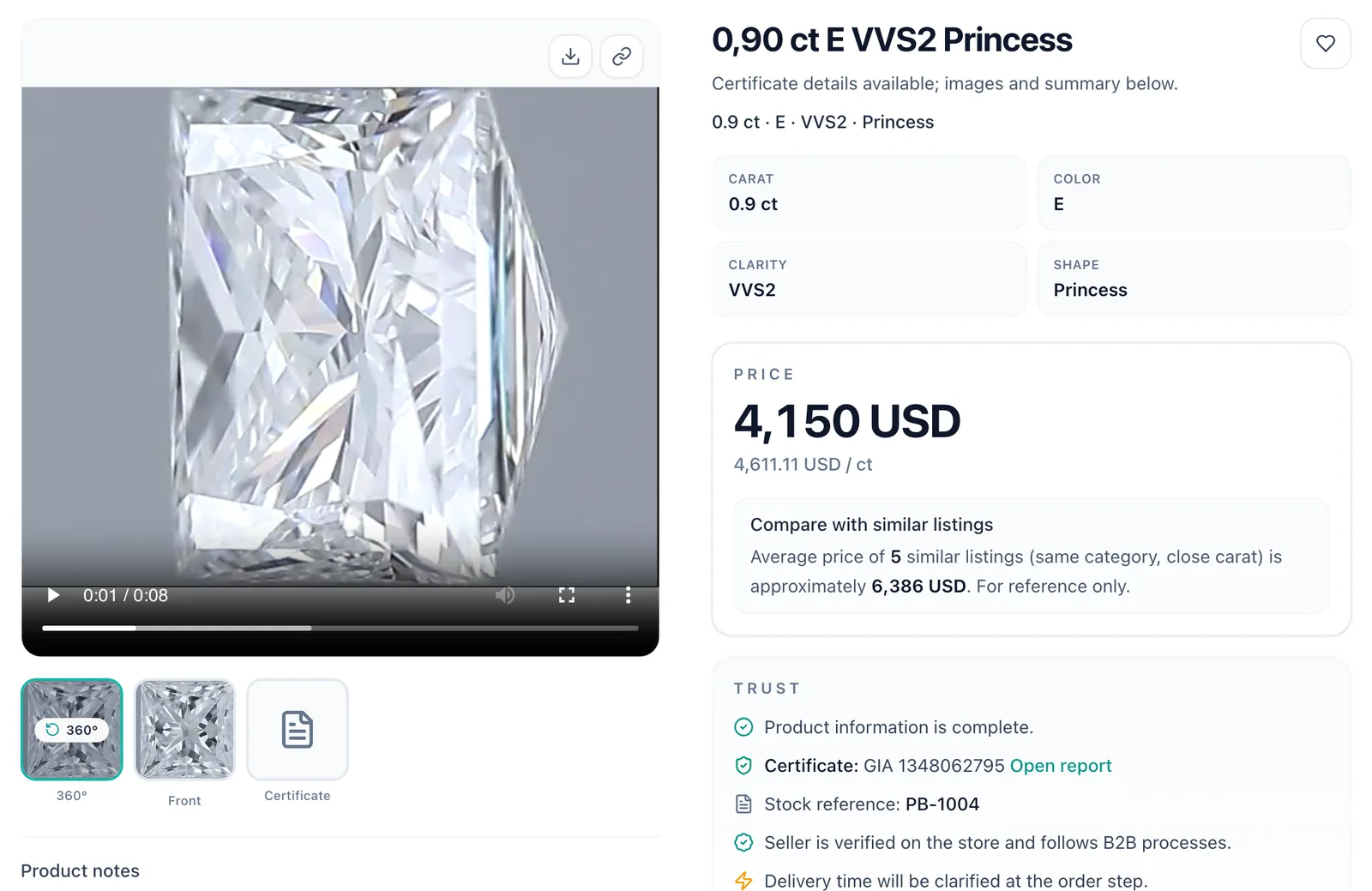
Every stone has a public page: 360° video, photos, a link to the certificate report, cut/polish/symmetry details. Send the link over WhatsApp — only the buyers you approve see the price.

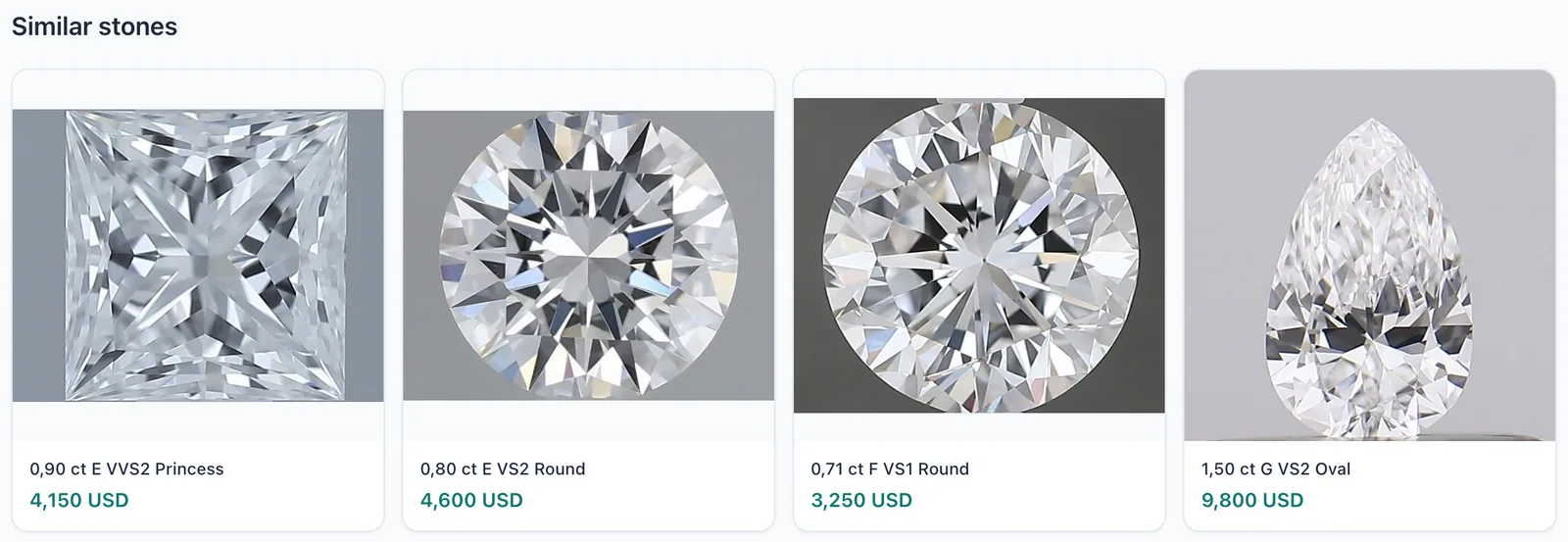
The stone's public page: 360° video, carat, color, clarity, price and GIA certificate details.Similar stones: four cards with photo, stone summary and price.

GOLD

Fine-gold tracking by karat, from production to closing.

Bullion, drawn wire, scrap, sweepings: every lot recorded with its karat and fine-gold equivalent. Gold purchase, melting, refining, production order and production closing in one flow. Loss and reconciliation are calculated automatically at every closing.

  • Automatic karat → fine gold conversion (22 karat 3 g = 2.750 g fine gold)
  • Stock sufficiency and current price check on the production order
  • Finished goods stock, with stone + gold cost
Gold stock: 37.1315 g fine gold in total; 4 lots, each with remaining grams and fine-gold equivalent.

Cost and profit on every sale, before you confirm.

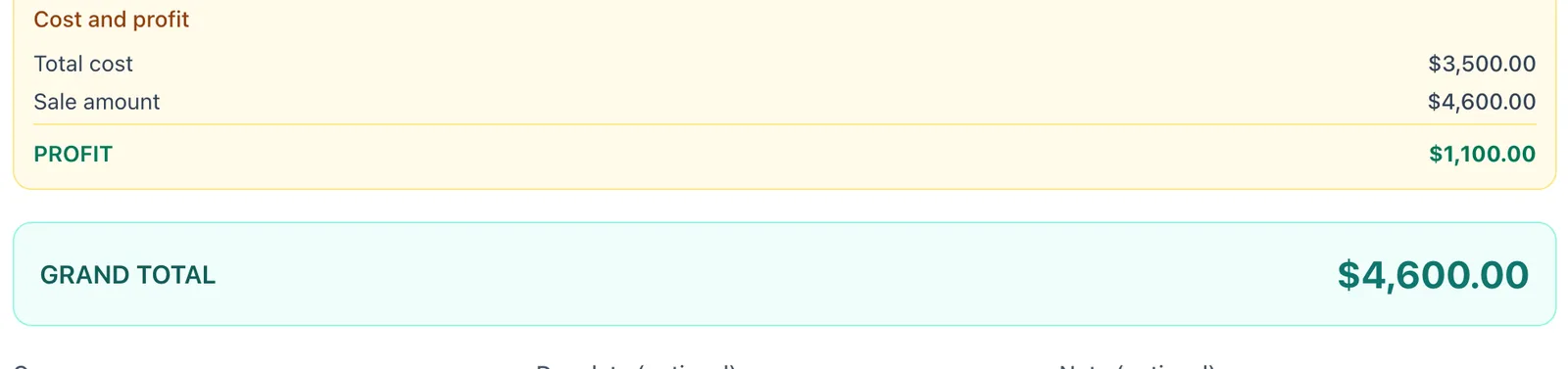
The sale summary shows the stone's cost, the sale amount and the profit side by side. The profit report doesn't wait for month-end.

Sale summary: total cost 3,500 USD, sale amount 4,600 USD, profit 1,100 USD.

It works on day one.

  1. 1Open your account and add your team with role-based access.
  2. 2Upload your existing Excel stock via CSV.
  3. 3Enter open memos and account balances. That's it.

Open your stock to approved buyers.

List the stones you choose on the GemsRoute buyer network, receive offers, make counter-offers. Your prices are visible only to buyers you approve.

Only you see your stock and your prices.

  • Your data is stored on encrypted servers in the EU (Frankfurt) and is never shared with any other seller or buyer.
  • Role-based access: sales, accounting and warehouse teams see only their own screens.
  • KVKK compliant; the privacy notice and terms of use are published openly.
  • Export your data to Excel and leave whenever you want.

From inside the diamond trade.

GemsRoute isn't a diamond add-on for a generic ERP. Memo, certificates, carat-based pricing, karat-to-fine-gold conversion and sales on terms are built into the foundation of the system. It's currently taking shape together with its first wholesalers; we give early adopters one-on-one onboarding and priority development support.

No commission, no hidden fees.

Pricing for international customers is available on request.

Contact us

Frequently asked questions

How do I import my stock from Excel?

My Products → Stock & movements → Import CSV. You map the columns once; later uploads are automatic.

How does memo tracking work?

You "send on consignment" a single stone or a parcel to the customer. The stone shows as "out" in stock and the day counter starts. If it comes back, "take back"; if it sells, "convert to sale" — the receivables entry is created by itself.

Is GemsTrace registration mandatory? Does it cost extra?

It's not mandatory. In Settings you choose: ask on every sale / always transfer / off. Pricing is settled in the demo call.

How does the transfer work if my dealer doesn't use GemsTrace?

The sale is still recorded in GemsTrace; if no account matches the dealer's tax number, a "pending review" record is opened and ownership is written there. The dealer receives an invitation email valid for 7 days; once they claim the account, the chain becomes theirs exactly as it is. No step returns an error, and the stone is never left without an owner.

Who sees my data?

Only your team, with the roles you assign. The prices of stones you publish in the store are visible only to buyers you approve. The GemsRoute team doesn't access your data without your support request.

How are team members given access?

Settings → Team. Sales, accounting, warehouse and manager roles are ready; each role sees only its own screens. Team size depends on your plan; ask us during the demo.

See it with your own stock.

In 30 minutes we show you the memo, receivables and traceability flow, tailored to the way you work.